





The connection changes the workflow
DAS means direct-attached storage: an internal drive, external USB SSD, Thunderbolt enclosure or other storage connected to one host. NAS means network attached storage: a device that serves files to authorized clients through the network.
A single external SSD and a multi-drive DAS enclosure are both directly attached, but their capacity, redundancy and interfaces differ. Likewise, a NAS file share and a complete photo application running beside it are different services. Compare specific arrangements rather than treating either acronym as one fixed product.
| Decision | DAS | NAS |
|---|---|---|
| Main access path | A direct connection to its host. | Network access through supported protocols or applications. |
| More than one user | Often relies on the host sharing files and staying available. | Designed to serve authorized clients independently of a workstation. |
| Active-work speed | Depends on storage, enclosure, cable and host interface. | Also depends on network links, protocol, latency and other users. |
| Administration | Host and enclosure setup; backup still required. | Accounts, updates, storage management and service maintenance. |
| Remote access | Requires a host or other service. | Requires a supported, deliberately configured remote-access method. |
| Independent recovery | Not provided by the connection type. | Not provided by the connection type. |
When direct-attached storage is a good answer
A photographer editing on one workstation may prefer a fast local SSD for the current shoot. A video editor with a large active project may need a low-latency working drive that the editing software supports. A portable external drive can also be a simple transfer or independent-backup destination.
If one computer owns the workflow, data volume is manageable and sharing is occasional, a carefully backed-up DAS arrangement can be a sensible choice.
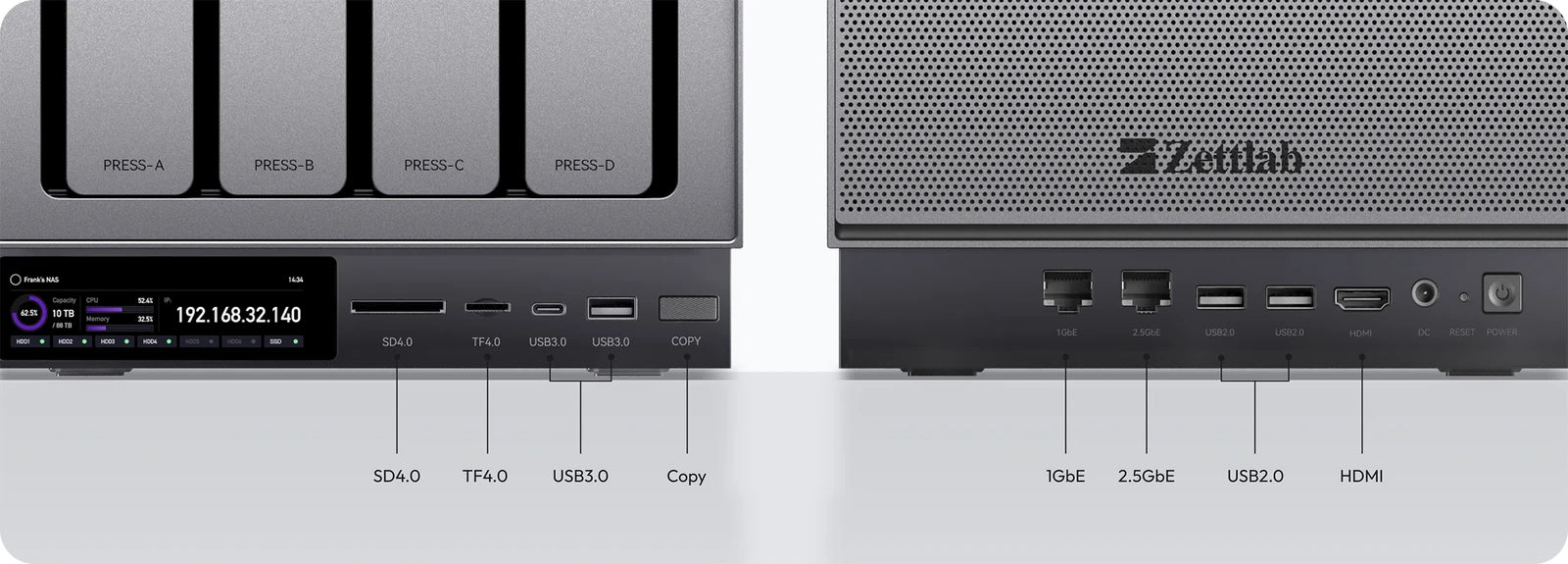
Check whether the enclosure supports the required drive count, cooling and interface speed. A USB connector's shape does not establish its bandwidth. A multi-drive enclosure also needs clear rules for disk replacement, filesystem recovery and power interruptions.
When network storage helps
A NAS becomes attractive when the archive should remain available while one laptop is away, several household members need their own access, or files should be organized in a consistent location instead of distributed across many portable disks.
For a creator, that can mean collecting project assets, keeping completed work and retrieving an older deliverable. For a household, it can mean a shared photo archive plus private user folders. Applications may add browsing, synchronization or media playback, provided the chosen system meets their requirements.
Network speed is a whole-path property. A 2.5GbE port has a theoretical line rate of 2.5 gigabits per second, but file transfers deliver less after protocol overhead and other limitations. Wi-Fi, the switch, client adapter, disks, workload and small-file behavior can all become the constraint. Do not choose a NAS from its port number alone.
A useful combination: work locally, archive centrally
- Keep the active project where the application expects it. Use the supported local working location, especially for live databases, photo libraries and performance-sensitive media.
- Collect everything needed to reopen it. Include source media, project files, referenced assets and a note of software and plugin versions where relevant.
- Copy a completed archive to the NAS. Retain an understandable structure and compare representative files before relying on it.
- Open a restored copy. Test the archive from a separate working location, not just by checking that filenames exist.
- Keep an independent copy. Use a separate device or destination with an appropriate retention and recovery policy.
This pattern can preserve local editing responsiveness and central organization. It is a workflow recommendation, not a measured claim that every project application works directly from a Zettlab share.
What neither option solves automatically
RAID can exist in either category. It may protect against certain member-drive failures, but it does not make an enclosure or NAS an independent backup of itself. A mounted archive can still be deleted by an authorized account or affected by a compromised client.
Sharing also introduces responsibility. Separate household access, restrict application accounts and document who maintains the system. If the only administrator's computer or password disappears, another person should still be able to find the recovery instructions.
Frequently asked questions
Is a NAS always slower than an external drive?
No universal comparison is useful. A slow external disk, a fast DAS array and different network systems produce different results. Compare the exact workload on the actual interfaces, rather than advertised maximums.
Can I turn a DAS into a NAS by sharing it?
A host can share attached storage when its operating system supports it. The host then becomes part of the storage service: its availability, permissions, updates and power state matter. This is not the same operational arrangement as a separate NAS.
Which should be my backup?
Either can be a destination, but independence and recovery are what matter. A single second copy permanently writable by the same account may not meet your needs. Decide retention, isolation and restore steps first.
Basics
What is NAS? A guide to network attached storage.
Read the guide
Storage comparisons