





What you can do
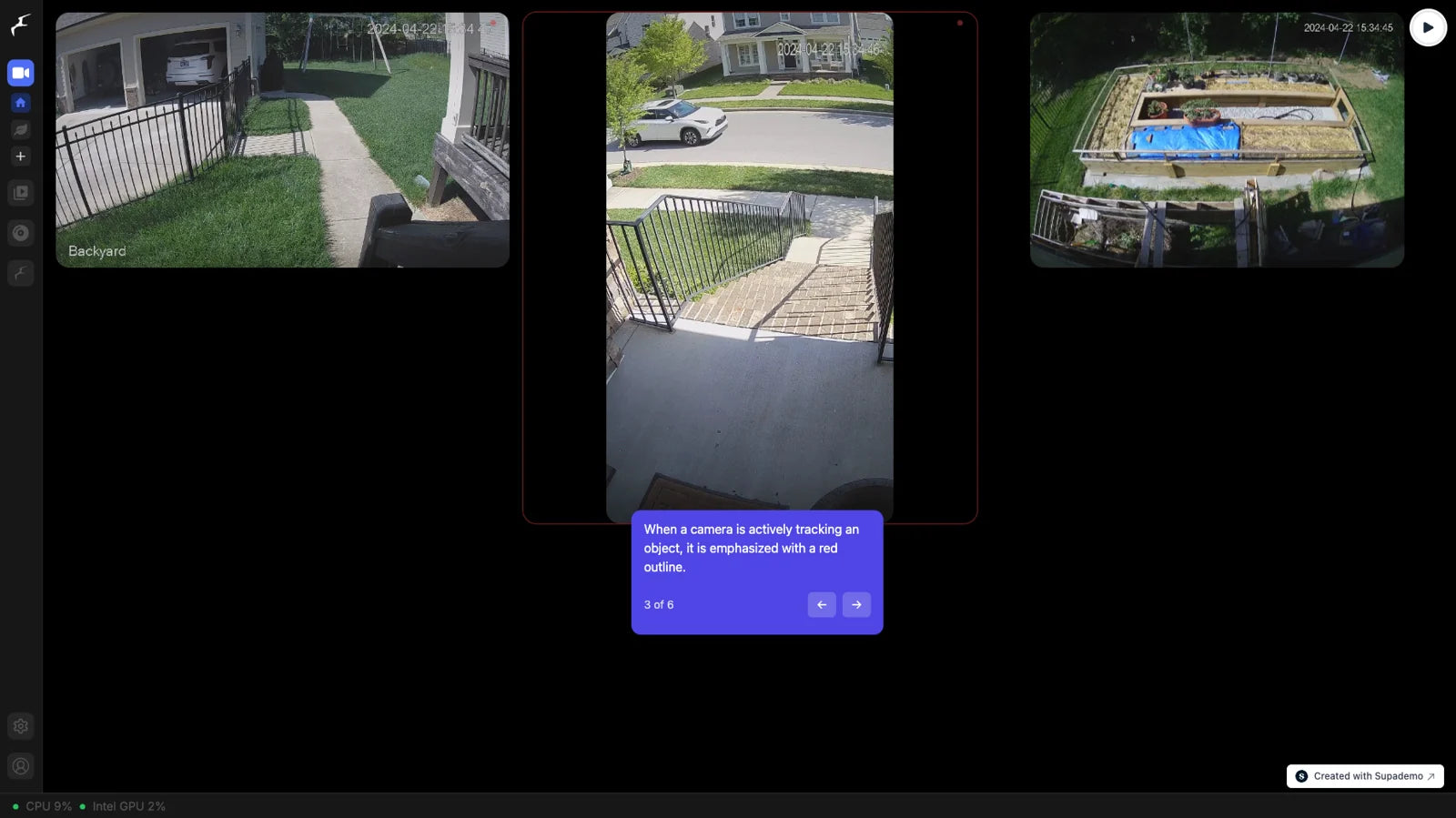
Record selected cameras and review events with a separate detection host.
Record one camera with an explicit retention policy, then find and export a known event rather than collecting video without a retrieval plan.
This is a third-party project, with its own host, release, maintenance and license conditions. Its features are separate from ZettOS native software.
App Center availability and installation route
Checked on 18 November 2026: Zettlab D6 · RK3588 · 16GB RAM · ZettOS 1.14.0. The complete App Center list showed 49 entries. This observation applies to that device and catalog snapshot.
Not observed in the checked App Center. This guide does not provide a confirmed one-click NAS installation. Check the manual or external-host arrangement below against the exact image, release, CPU architecture, runtime, resources and data requirements. Absence from this catalog does not establish that the application is unsupported.
Installation, application operation, hardware acceleration and recovery on this NAS remain untested. Official installation, storage and ports.
Choose the host and data paths
- Guide arrangement
- External Debian/Linux detection host with validated camera/accelerator access; NAS as a deliberate recording or backup destination.
- NAS role
- Provide a deliberately selected recording or backup destination. Camera access, detection and accelerator support belong to the validated external Frigate host.
- Host requirements
- Frigate recommends low-overhead access to GPU/detector hardware. Its current getting-started example is an amd64 starter, not a universal ARM or ZettOS configuration.
- Device validation
- Not observed in checked App Center; reference deployment untested. Installation, hardware acceleration and recovery on a Zettlab device have not been tested.

Supported external application host
NAS files / deliberate backup target
Application state + independent copy
This application was not observed in the checked D6 / ZettOS 1.14.0 App Center. The manual or external-host reference below requires its own compatibility checks; this observation does not establish that it is unsupported.
Before you start
- Obtain one camera RTSP URL and a dedicated camera account. Choose detect resolution, recording bitrate and a short test retention period.
- Check the exact image, decoder and detector for the execution host. Calculate shared memory from detect resolution and camera count; the example 512 MB is not a universal requirement. Use /tmp/cache for the intended local in-memory recording cache and estimate sustained write volume before mounting NAS storage.
- Prepare persistent /config and /media/frigate paths. Test that a missing NAS mount cannot silently redirect recordings to an empty local directory.
Set up and use the reference arrangement
-
Start the documented container
Adapt Frigate’s installation Compose to the external host, mapping /config and /media/frigate and sizing shared memory. Keep internal unauthenticated port 5000 off the ordinary client network; go2rtc RTSP on 8554 is also unauthenticated by default and needs a deliberate access/authentication plan.
-
Sign in and add one camera
Use the release’s authenticated interface, normally https://server-address:8971 with default TLS, and the initial credentials reported in logs. Check the actual TLS configuration before changing protocol. Add one camera using the current wizard or release-matched YAML.
-
Separate recording and detection work
First confirm the stream plays. Configure supported decoding acceleration and the selected detector only for hardware the host can actually expose; keep record and detect stream choices explicit.
-
Set retention and retrieve a moment
Enable recording with a deliberately short retention policy. Walk through the camera view, find the expected interval/event and export a short clip through the UI. Exports are not removed by recording-retention rules, so plan and inspect their space separately.
-
Check disk and restart behavior
Review errors, sustained storage use and available space. Restart with the camera online and verify both new recordings and the previous retained interval remain accessible.
Check the first useful result
Keep the complete application state
- /config, including configuration and the SQLite database.
- /media/frigate recording, snapshot and export data needed for the retention/recovery scope.
- Compose, selected image, mount method, detector configuration and protected camera credentials.
Back up and bring it back
- For a coordinated test recovery set, stop Frigate cleanly and copy /config with the media needed for the same time window; keep exports needed beyond retention separately.
- Restore those paths on a matching isolated host, confirm permissions and mount readiness, then start without conflicting with the production camera consumer.
- Play the saved interval and export it again; separately confirm the restored camera can create a fresh recording.
Check limits and ongoing work
- The community-supported stable-rk route requires the documented Rockchip BSP kernel 5.10/6.1, rkvdec2/rknpu drivers, RKNPU driver v0.9.2 or later and the required exposed devices. An RK3588 model name alone does not establish that this ZettOS kernel/container has them.
- Recording retention intentionally deletes old segments; it is not an indefinite archive or backup.
- MQTT is optional for standalone Frigate but required for its Home Assistant integration; both applications must use the intended same broker. A standalone recorder does not automatically provide that integration.
Review release notes before updating. Keep the matching configuration and a consistent pre-update recovery set; a database migration may require restoring data with the matching software rather than simply using an older image.
Confirm the project’s current license and the exact free or paid feature boundaries for your intended task. Self-hosting does not make external APIs, cloud destinations or separate compute free.
Choose your NAS configuration
Choose D4 or D6 by storage capacity, growth and independent-copy needs. The external application host is a separate requirement; selecting 16GB NAS RAM does not supply that host.
- D4 · 4 SATA bays
- Compare a four-drive layout against the current archive, expected growth and independent recovery copy. See the D4.
- D6 · 6 SATA bays
- Compare a six-drive layout when more drive-bay capacity or a different growth plan is useful. More bays do not establish a faster application or network. See the D6.
- 8GB / 16GB RAM
- These are separate SKU choices on each product page. Confirm the selected release’s requirements and combined operating load; no application-specific memory recommendation has been device-tested here.
- Complete system cost
- Enclosures are diskless. Allow for compatible drives, independent backup storage and any external application host, paid features or service/API charges required by the task. Current prices and delivery belong on the product page.
Official references
- Official installation, storage and portsDocumentation read 2026-11-18
- Official first-camera workflowDocumentation read 2026-11-18
- Official recording and retentionDocumentation read 2026-11-18
- ZettOS Docker Projects
For Home
Plan Useful Home Server Workflows
Read the guide
Basics