





What you can do
Chat with a chosen model through a web UI backed by a separate model host.
Give a household or small team a chat interface connected to a separately identified model server, with persistent accounts, chats and uploads.
This is a third-party project, with its own host, release, maintenance and license conditions. Its features are separate from ZettOS native software.
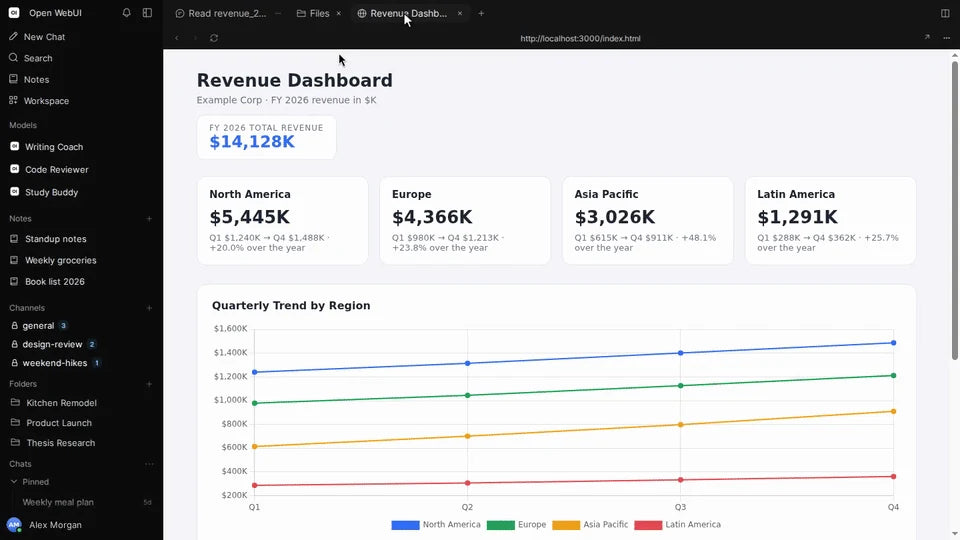
App Center availability and installation route
Checked on 18 November 2026: Zettlab D6 · RK3588 · 16GB RAM · ZettOS 1.14.0. The complete App Center list showed 49 entries. This observation applies to that device and catalog snapshot.
Not observed in the checked App Center. This guide does not provide a confirmed one-click NAS installation. Check the manual or external-host arrangement below against the exact image, release, CPU architecture, runtime, resources and data requirements. Absence from this catalog does not establish that the application is unsupported.
Installation, application operation, hardware acceleration and recovery on this NAS remain untested. Official setup and remote Ollama connection.
Choose the host and data paths
- Guide arrangement
- Conditional WebUI host + external model host
- NAS role
- May store UI state, documents or deliberately chosen model data; model inference remains on the configured compute host.
- Host requirements
- Open WebUI documents Linux x86-64 and ARM64 support. The interface can connect to Ollama on another server; placing the UI on NAS does not move model inference onto NAS.
- Device validation
- Not observed in checked App Center; reference deployment untested. Installation, hardware acceleration and recovery on a Zettlab device have not been tested.

WebUI + identified model host
UI state / selected documents
Accounts + state + required configuration
This application was not observed in the checked D6 / ZettOS 1.14.0 App Center. The manual or external-host reference below requires its own compatibility checks; this observation does not establish that it is unsupported.
For a separate supported project, ZettOS documents Docker → Projects → + Create and YAML paste/import. Manage App Center installations in App Center. Match the exact image, data paths, permissions and ports before deployment.
Before you start
- Identify the model backend and an address the WebUI container can reach. Choose a small test model and a non-sensitive test document if document use is required.
- Create persistence at /app/backend/data, select an available host port mapped to 8080 and generate a fixed WEBUI_SECRET_KEY.
- Keep authentication enabled and decide who can create accounts. Record embedding/document-processing configuration separately from the chat model.
Set up and use the reference arrangement
-
Start the interface with persistent state
Use the official release image with /app/backend/data and a fixed WEBUI_SECRET_KEY. Pin vX.Y.Z rather than :main/:latest, which follow rolling main builds. Choose the standard image for local document processing; the slim variant removes local embedding/speech/document components and requires separately configured processing services for those tasks.
-
Connect the actual model service
Set OLLAMA_BASE_URL to the external reachable Ollama URL or configure a documented compatible provider. Do not use localhost to mean another machine.
-
Create an account and send a known prompt
Finish the administrator setup, select the intended model and ask a simple question. Compare backend logs/model identity with the UI selection.
-
Try a document in a small separate test
For document use, first verify the chosen image has the required embedding/extraction path or that the external services are configured; do not assume slim has local processing. Upload a non-sensitive document, ask a known-answer question and inspect returned sources and the actual processing location.
-
Check household isolation
Create a second restricted test account where supported. Verify its visible chats/documents match the intended access policy, then recreate the container and confirm state persists.
Check the first useful result
Keep the complete application state
- The entire /app/backend/data volume containing users, chats, settings and uploads.
- WEBUI_SECRET_KEY and protected backend/provider credentials.
- Selected image version, model endpoint and any separately configured external database/vector/file storage.
Back up and bring it back
- Stop WebUI for a coordinated copy of its data volume, following the official backup/update guidance; include external stores when configured.
- Restore the volume and fixed secret key to an isolated compatible container and point it at the intended test backend.
- Sign in, open a saved chat and uploaded document, then make a fresh model request. A database migration can prevent simply downgrading an image.
Check limits and ongoing work
- Model inference, embeddings and document conversion can run in different places and have different resource/network requirements.
- An ARM64-compatible interface is not evidence of NAS GPU/NPU inference performance.
- Optional external providers can receive prompts or document content according to their configuration.
Review release notes before updating. Keep the matching configuration and a consistent pre-update recovery set; a database migration may require restoring data with the matching software rather than simply using an older image.
Confirm the project’s current license and the exact free or paid feature boundaries for your intended task. Self-hosting does not make external APIs, cloud destinations or separate compute free.
Choose your NAS configuration
Choose storage around the retained documents and UI state. Size the separate model host for its actual model; NAS RAM selections are not an inference benchmark.
- D4 · 4 SATA bays
- Compare a four-drive layout against the current archive, expected growth and independent recovery copy. See the D4.
- D6 · 6 SATA bays
- Compare a six-drive layout when more drive-bay capacity or a different growth plan is useful. More bays do not establish a faster application or network. See the D6.
- 8GB / 16GB RAM
- These are separate SKU choices on each product page. Confirm the selected release’s requirements and combined operating load; no application-specific memory recommendation has been device-tested here.
- Complete system cost
- Enclosures are diskless. Allow for compatible drives, independent backup storage and any external application host, paid features or service/API charges required by the task. Current prices and delivery belong on the product page.
Official references
- Official setup and remote Ollama connectionDocumentation read 2026-11-18
- Official updates and persistent-data recoveryDocumentation read 2026-11-18
- ZettOS Docker Projects
Basics
Plan an AI Document Workflow with NAS Storage
Read the guide
Basics