





What you can do
Synchronize personal notes and attachments between devices.
Synchronize notes and attachments between two Joplin clients while keeping a separate export and server recovery path.
This is a third-party project, with its own host, release, maintenance and license conditions. Its features are separate from ZettOS native software.
App Center availability and installation route
Checked on 18 November 2026: Zettlab D6 · RK3588 · 16GB RAM · ZettOS 1.14.0. The complete App Center list showed 49 entries. This observation applies to that device and catalog snapshot.
Not observed in the checked App Center. This guide does not provide a confirmed one-click NAS installation. Check the manual or external-host arrangement below against the exact image, release, CPU architecture, runtime, resources and data requirements. Absence from this catalog does not establish that the application is unsupported.
Installation, application operation, hardware acceleration and recovery on this NAS remain untested. Official server installation, users and storage.
Choose the host and data paths
- Guide arrangement
- Conditional supported-image Docker project with PostgreSQL; external host if the chosen server image does not match the NAS architecture.
- NAS role
- May host a compatible container and its supported local data paths after checking the exact image, runtime and resource requirements; use the stated external-host alternative when needed.
- Host requirements
- The official server README treats default SQLite as a test/development route and recommends a database for production. It stores item content in the database by default; optional filesystem/S3 storage changes what must be backed up.
- Device validation
- Not observed in checked App Center; reference deployment untested. Installation, hardware acceleration and recovery on a Zettlab device have not been tested.

Conditionally supported application host
Application-specific persistent data
Consistent state + independent backup
This application was not observed in the checked D6 / ZettOS 1.14.0 App Center. The manual or external-host reference below requires its own compatibility checks; this observation does not establish that it is unsupported.
For a separate supported project, ZettOS documents Docker → Projects → + Create and YAML paste/import. Manage App Center installations in App Center. Match the exact image, data paths, permissions and ports before deployment.
Before you start
- Use release-matched .env and Compose files and verify the server image architecture. The README describes a server-only profile, but the reviewed dev Compose still makes app depend on full-profile transcribe. Inspect docker compose --profile server config and its dependency closure; choose or deliberately adapt a coherent released server-only definition rather than assuming that flag makes the dev file runnable.
- Create a supported PostgreSQL database/user with persistent local database storage; choose APP_BASE_URL and the address clients will use.
- Keep existing client notes/export unchanged before changing sync targets. Prepare a separate non-admin sync user.
Set up and use the reference arrangement
-
Deploy server and database
Deploy only the selected server and PostgreSQL services using a validated, release-matched definition. Ensure the database and user exist, use the database service hostname rather than localhost for a sibling container, and keep default database-backed item storage for the first test.
-
Secure the administrator
Open the mapped 22300 admin endpoint, change the initial administrator credentials according to the current README and create the normal sync account.
-
Connect the first Joplin client
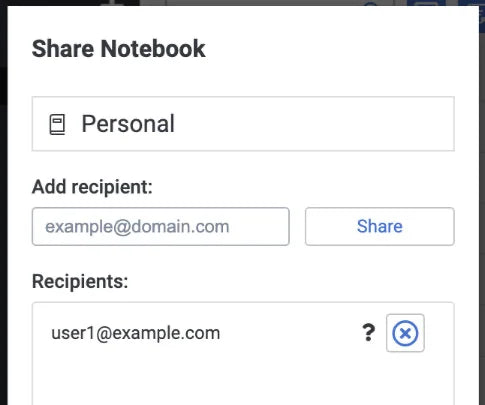
Select Joplin Server as the sync target, enter the base URL and normal user credentials, and use the connection check before synchronizing a small test notebook.
-
Add a second client and attachment
Connect another Joplin client to the same test account. Sync a note with a tag and attachment, edit it on one device and verify the change on the other.
-
Separate backup from sync
Export the test notebook as JEX on a client and retain it independently. For server recovery, plan a coordinated PostgreSQL backup plus any optional external item storage and configuration.
Check the first useful result
Keep the complete application state
- Consistent PostgreSQL database backup; it contains item contents with the default storage driver.
- Filesystem/S3 item storage as well if configured.
- Compose/.env, APP_BASE_URL, server version and client-side JEX exports kept as a separate note-recovery path.
Back up and bring it back
- Stop writes/sync for a controlled recovery exercise, create a database-native backup and coordinate any external item storage copy.
- Restore database, optional item storage and configuration on an isolated matching server; use a fresh client profile for validation so it cannot propagate changes into the live sync set.
- Verify the notebook and attachment. Separately import the JEX export into another profile to establish a second recovery route.
Check limits and ongoing work
- Sync propagates changes and deletions; it is not an independent backup.
- A database backup is incomplete if item content was moved to filesystem/S3 storage and those objects are missing.
- The reviewed README and Compose are development-branch references and contain the server-profile dependency discrepancy described above. Verify released definitions and current personal/business licensing. A reverse proxy must replace X-Real-IP with the actual client address, not trust a client-supplied header.
Review release notes before updating. Keep the matching configuration and a consistent pre-update recovery set; a database migration may require restoring data with the matching software rather than simply using an older image.
Confirm the project’s current license and the exact free or paid feature boundaries for your intended task. Self-hosting does not make external APIs, cloud destinations or separate compute free.
Choose your NAS configuration
Choose drive bays for the archive and growth. Choose memory only after allowing for ZettOS, this application, databases and concurrently running services; 8GB/16GB are configuration choices, not tested application recommendations.
- D4 · 4 SATA bays
- Compare a four-drive layout against the current archive, expected growth and independent recovery copy. See the D4.
- D6 · 6 SATA bays
- Compare a six-drive layout when more drive-bay capacity or a different growth plan is useful. More bays do not establish a faster application or network. See the D6.
- 8GB / 16GB RAM
- These are separate SKU choices on each product page. Confirm the selected release’s requirements and combined operating load; no application-specific memory recommendation has been device-tested here.
- Complete system cost
- Enclosures are diskless. Allow for compatible drives, independent backup storage and any external application host, paid features or service/API charges required by the task. Current prices and delivery belong on the product page.
Official references
- Official server installation, users and storageDocumentation read 2026-11-18
- Official JEX export and reimportDocumentation read 2026-11-18
- Official development Compose inspected for dependency closureDocumentation read 2026-11-18
- ZettOS Docker Projects
For Home
Keep a Personal Library You Can Find and Recover
Read the guide
Basics