





What you can do
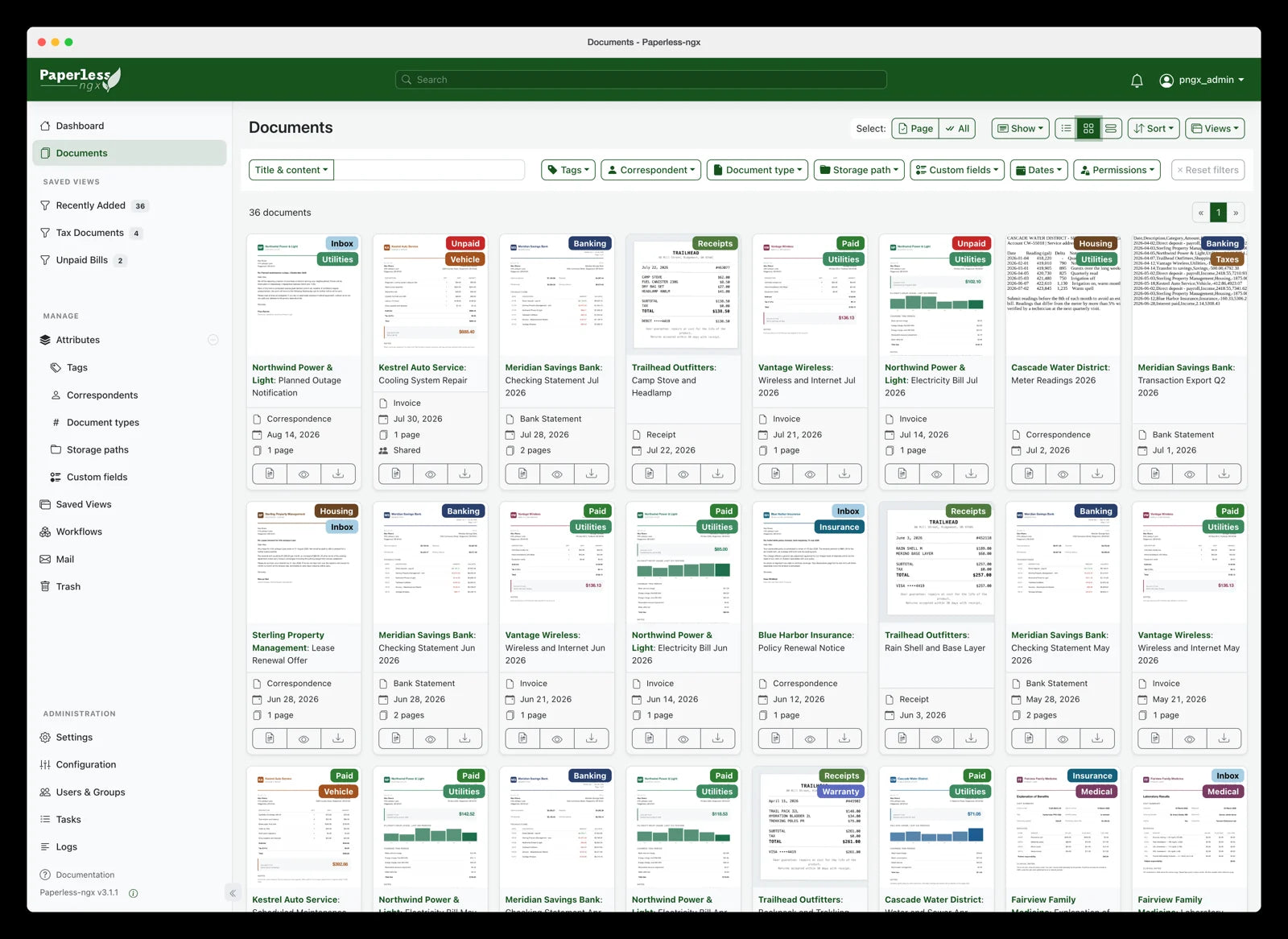
Organize scanned paperwork and receipts with searchable text and metadata.
Turn scanned PDFs into an OCR-searchable document library, with deliberate tags, correspondents and a portable recovery export.
This is a third-party project, with its own host, release, maintenance and license conditions. Its features are separate from ZettOS native software.
App Center availability and installation route
Checked on 18 November 2026: Zettlab D6 · RK3588 · 16GB RAM · ZettOS 1.14.0. The complete App Center list showed 49 entries. This observation applies to that device and catalog snapshot.
Not observed in the checked App Center. This guide does not provide a confirmed one-click NAS installation. Check the manual or external-host arrangement below against the exact image, release, CPU architecture, runtime, resources and data requirements. Absence from this catalog does not establish that the application is unsupported.
Installation, application operation, hardware acceleration and recovery on this NAS remain untested. Paperless-ngx v3.5.1 setup.
Choose the host and data paths
- Guide arrangement
- ZettOS Docker Projects (conditional)
- NAS role
- May host a compatible container and its supported local data paths after checking the exact image, runtime and resource requirements; use the stated external-host alternative when needed.
- Host requirements
- Use the release-matched official Compose project only after confirming ARM64 availability for every selected image, OCR resources and local database storage. Start with PDF/image documents; optional document-conversion services need their own architecture checks. An external Linux host is the fallback.
- Device validation
- Not observed in checked App Center; reference deployment untested. Installation, hardware acceleration and recovery on a Zettlab device have not been tested.

Conditionally supported application host
Application-specific persistent data
Consistent state + independent backup
This application was not observed in the checked D6 / ZettOS 1.14.0 App Center. The manual or external-host reference below requires its own compatibility checks; this observation does not establish that it is unsupported.
For a separate supported project, ZettOS documents Docker → Projects → + Create and YAML paste/import. Manage App Center installations in App Center. Match the exact image, data paths, permissions and ports before deployment.
Before you start
- Keep original scans in a separate staging folder; the consume folder is an ingestion queue, not your only archive.
- Prepare persistent data, media, export, consume and database locations plus a supported broker.
- Choose OCR languages and a random PAPERLESS_SECRET_KEY; download the matching official Compose/env examples.
Set up and use the reference arrangement
-
Create the document project
Download the chosen release’s PostgreSQL Compose example together with docker-compose.env and .env. Map persistent data/media/export/consume to /usr/src/paperless/data, /usr/src/paperless/media, /usr/src/paperless/export and /usr/src/paperless/consume; preserve the selected PostgreSQL image’s exact volume target. Configure the release’s broker/database connection and credentials (the reviewed stable example uses PAPERLESS_REDIS, PAPERLESS_DBHOST and PAPERLESS_DBENGINE). Use ZettOS Docker > Projects > + Create, set name/save path, import or paste the reviewed YAML and Deploy; inspect Containers and Logs. Manage App Center installations there. Verify every selected image’s architecture and env-file handling before deployment.
-
Create an administrator and import
Follow the administrator-creation method for the selected release: the reviewed v3.5.1 setup prompts for a superuser on the initial web interface. Upload a copy of a test PDF, or copy it into consume. If that folder is on a filesystem without inotify (for example NFS), set a positive PAPERLESS_CONSUMER_POLLING_INTERVAL. Watch consumption/OCR logs and wait for completion.
-
Make retrieval useful
Assign a correspondent, document type and a meaningful tag. Search for a distinctive word printed in the scan, open the result and download the original to verify that OCR search and original retention are separate working tasks.
-
Export a recovery set
Pause new consumption and use the chosen release’s document_exporter against the mapped export directory. In the reviewed Compose layout the documented command is docker compose exec -T webserver document_exporter ../export. Copy the recovery output to independent storage and separately save secrets/configuration; the export excludes API tokens. Record the exact Paperless version for re-import.
Check the first useful result
Keep the complete application state
- Original and derived documents under media, plus persistent application data and a consistent database backup.
- The document_exporter recovery output containing documents, metadata and database contents.
- Compose/environment configuration, PAPERLESS_SECRET_KEY and other credentials; exporter exclusions such as API tokens must be handled separately.
Back up and bring it back
- Stop active consumption while coordinating a database/files backup or producing the document export.
- Create an isolated instance of the same Paperless release that created the export. document_importer must target a completely empty database and application directories (data-only import has different rules). Import the copied exporter output, or follow that release’s full filesystem/database restore route; upgrade only after proving the restored version.
- Verify one original, OCR text, tag, correspondent and permissions before feeding the real consume queue again.
Check limits and ongoing work
- The live documentation site returned HTTP403 during the initial research. Its official repository sources were read, then setup, administration and the PostgreSQL Compose example were independently re-read at the stable v3.5.1 release tag during this audit. The guide must still be matched to the actual version selected for deployment.
- A sample OCR result is not evidence of complete OCR accuracy or support for every language/file format.
- The importer/exporter and optional conversion services have release-specific constraints; do not mix unmatched versions.
Review release notes before updating. Keep the matching configuration and a consistent pre-update recovery set; a database migration may require restoring data with the matching software rather than simply using an older image.
Confirm the project’s current license and the exact free or paid feature boundaries for your intended task. Self-hosting does not make external APIs, cloud destinations or separate compute free.
Choose your NAS configuration
Choose drive bays for the archive and growth. Choose memory only after allowing for ZettOS, this application, databases and concurrently running services; 8GB/16GB are configuration choices, not tested application recommendations.
- D4 · 4 SATA bays
- Compare a four-drive layout against the current archive, expected growth and independent recovery copy. See the D4.
- D6 · 6 SATA bays
- Compare a six-drive layout when more drive-bay capacity or a different growth plan is useful. More bays do not establish a faster application or network. See the D6.
- 8GB / 16GB RAM
- These are separate SKU choices on each product page. Confirm the selected release’s requirements and combined operating load; no application-specific memory recommendation has been device-tested here.
- Complete system cost
- Enclosures are diskless. Allow for compatible drives, independent backup storage and any external application host, paid features or service/API charges required by the task. Current prices and delivery belong on the product page.
Official references
- Paperless-ngx v3.5.1 setupDocumentation read 2026-11-18
- Paperless-ngx v3.5.1 backup and restoreDocumentation read 2026-11-18
- Paperless-ngx v3.5.1 PostgreSQL Compose referenceDocumentation read 2026-11-18
- ZettOS Docker Projects
Development, alternative and historical reference context
These references describe another branch, database choice or older route. Use the selected release and deployment references above for this guide. Do not combine configurations from these alternatives with that arrangement.
- Development documentation: Official repository installation guideDocumentation read 2026-11-18
- Development documentation: Exporter/importer and backup contentsDocumentation read 2026-11-18
- Development documentation: Document tags and correspondentsDocumentation read 2026-11-18
For Home
Keep a Personal Library You Can Find and Recover
Read the guide
Basics