





What you can do
Run downloads separately from a work computer and organize completed files.
Run an authorized download independently of a work computer, while preserving incomplete/completed paths and the information needed to resume it.
This is a third-party project, with its own host, release, maintenance and license conditions. Its features are separate from ZettOS native software.
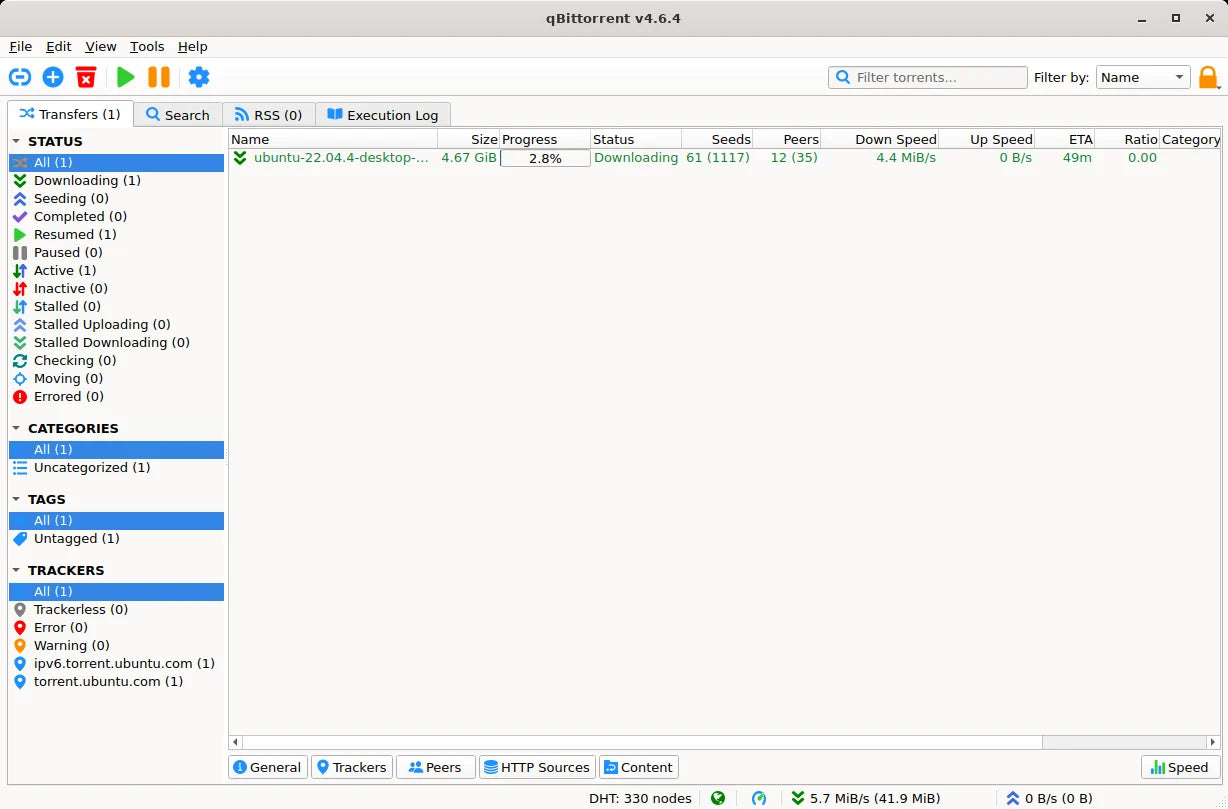
App Center availability and installation route
Checked on 18 November 2026: Zettlab D6 · RK3588 · 16GB RAM · ZettOS 1.14.0. The complete App Center list showed 49 entries. This observation applies to that device and catalog snapshot.
Available in the checked App Center. The displayed tag and port describe the store package. They do not establish a running version or a tested connection.
- App Center
- Listed
- Observed package state
- Enable action shown; package not enabled
- Displayed version / tag
- latest
- Displayed service port
- 8181
Use the App Center package
- Open App Center and select the exact application. Review that package’s release, resource requirements, service port and data location before installation or enablement.
- Use the package action only after checking storage, permissions and the application’s instructions. Open it through the actual service address shown by your device; do not substitute an upstream default port.
- Complete the first useful task and a separate recovery trial before relying on the service. These actions were not performed during the read-only catalog check.
The reference host, diagram and setup steps that follow describe a separate upstream route. Do not paste its Compose configuration, paths or environment variables into an App Center package. Some displayed packages are older than current upstream instructions; match the package release before applying version-specific steps.
Installation, application operation, hardware acceleration and recovery on this NAS remain untested.
Choose the host and data paths
- Guide arrangement
- External Linux host + NAS downloads
- NAS role
- Provide the deliberately mounted download location. Check ownership, completed-file paths and missing-mount behavior on the external download host.
- Host requirements
- The first-party docs describe qbittorrent-nox on a headless Linux server, not an official ZettOS package or first-party Docker image. This guide uses that supported host path with a validated NAS download mount; a third-party container would require a separate publisher/architecture review.
- Device validation
- App Center listing checked; installation untested. Installation, hardware acceleration and recovery on a Zettlab device have not been tested.

Supported external application host
NAS files / deliberate backup target
Application state + independent copy
App Center lists this application on the checked D6 / ZettOS 1.14.0. Use App Center for that package; the reference arrangement below follows upstream documentation and is a separate route. Installation, operation and recovery were not tested.
Before you start
- Choose a supported Linux distribution with a trusted qbittorrent-nox package and an account dedicated to downloads.
- Create separate incomplete and complete test directories on a stable NAS mount; verify write access and free space.
- Use an authorized public test torrent, such as a distribution’s official image, and keep the WebUI limited to the LAN.
Set up and use the reference arrangement
-
Install the headless package
Install qbittorrent-nox from the selected distribution’s trusted repository using that distribution’s package instructions; run it under the dedicated account. The official headless guide does not require a graphical desktop.
-
Secure the WebUI
Read the application startup output and current WebUI instructions for the actual listen port and initial credential behavior. Set a unique administrator password before exposing the interface to another device; do not copy an old default password from an unrelated guide.
-
Set exact download paths
Configure the default save directory and optional incomplete directory to the mounted NAS locations. Add the authorized sample and inspect the selected content and destination before starting.
-
Test pause, restart and verification
Pause the task, restart the service and confirm that the same job/path resumes. Once complete, use the client’s recheck and the publisher’s independent checksum if provided.
Check the first useful result
Keep the complete application state
- The download account’s qBittorrent configuration and data directories. The current Linux FAQ lists ~/.config/qBittorrent/ for preferences and ~/.local/share/qBittorrent/ for data; an existing legacy install may instead use ~/.local/share/data/qBittorrent/. Confirm the actual paths and packaging before copying.
- Original torrent files, job/resume data inside the application data directory and exact directory mappings.
- Complete and incomplete payload files; a settings backup alone cannot recover downloaded content.
Back up and bring it back
- Stop qBittorrent and copy configuration/data plus the retained payloads to independent storage.
- Restore on a compatible installation with the same account access and mapped paths; do not open the only backup as a writable download destination.
- Start paused, inspect each save path and force a recheck before resuming transfers.
Check limits and ongoing work
- This upstream headless reference route is separate from the App Center package observed on the checked D6; no first-party Docker deployment was established.
- Use only content you are authorized to transfer; peer traffic and WebUI access need separate network decisions.
- NAS share availability and sustained writes are part of the workload; app startup alone does not validate them.
Review release notes before updating. Keep the matching configuration and a consistent pre-update recovery set; a database migration may require restoring data with the matching software rather than simply using an older image.
Confirm the project’s current license and the exact free or paid feature boundaries for your intended task. Self-hosting does not make external APIs, cloud destinations or separate compute free.
Choose your NAS configuration
Choose D4 or D6 by storage capacity, growth and independent-copy needs. The external application host is a separate requirement; selecting 16GB NAS RAM does not supply that host.
- D4 · 4 SATA bays
- Compare a four-drive layout against the current archive, expected growth and independent recovery copy. See the D4.
- D6 · 6 SATA bays
- Compare a six-drive layout when more drive-bay capacity or a different growth plan is useful. More bays do not establish a faster application or network. See the D6.
- 8GB / 16GB RAM
- These are separate SKU choices on each product page. Confirm the selected release’s requirements and combined operating load; no application-specific memory recommendation has been device-tested here.
- Complete system cost
- Enclosures are diskless. Allow for compatible drives, independent backup storage and any external application host, paid features or service/API charges required by the task. Current prices and delivery belong on the product page.
Official references
- Official headless qbittorrent-nox guideDocumentation read 2026-11-18
- Official configuration/data locationsDocumentation read 2026-11-18
- Official project and distribution contextDocumentation read 2026-11-18
- ZettOS App Center installation
For Home
Build a NAS Media Library You Can Keep Using
Read the guide
For Home